How interactive voice response works: everything you need to know
Explore the world of the interactive voice server at the touch of a button 1️⃣!
The IVR represents an integrated advance in today’s corporate telephony solutions, playing an essential role in managing large call flows and improving customer relations, all in an increasingly collaborative and mobile working environment.
Immerse yourself in the discovery of various telephony solutions as you explore the definition and operation of an interactive voice response (IVR) server, and its many advantages.
1- What is an interactive voice server (IVR)?
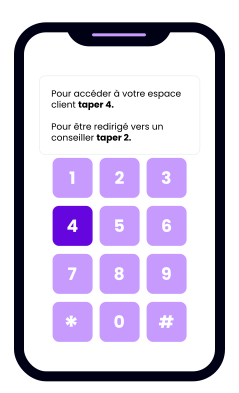
Interactive Voice Response (IVR) is a computer system dedicated to telephony. It interacts with users over the telephone by proposing voice exchanges or using keyboard keys, notably through the configuration of voice menus.
It can be referred to by other terms such as interactive switchboard, interactive answering machine, interactive telephone server or automatic switchboard. This functionality integrates seamlessly into the context of cloud telephony and VoIP (Voice over Internet Protocol).
Do you want to guarantee the availability and quality of your IVR? Discover our best practices in the webinar “How to monitor your IVR?.
2- The basic principles of IVR operation
Before delving deeper into how an Interactive Voice Response (IVR) system works, let’s take a closer look at its structure and constituent components. Our aim is not to delve into all the sometimes complex technical aspects of an IVR. We’re simply going to analyze the different elements of an IVR to get an overall, accessible view, and thus acquire the keys needed to understand how it works.
An interactive voice server is a voice application made up of several elements. For the sake of simplicity, let’s classify these elements into three categories: phone numbers, audio messages and call flow.
- Interactive voice server telephone numbers
The primary objective of an interactive voice server is to enable companies to offer their callers the best possible telephone service, by automatically handling and routing their calls. Telephone numbers therefore naturally play an important role. On the one hand, the access number is the telephone number dialed by a company’s prospects and customers, representing the gateway to the interactive voice server. On the other hand, destination numbers are the telephone numbers of the company’s teams or employees, to which calls will be redirected following routing.
- Interactive voice server audio messages
Within an interactive voice server, audio messages are real guides for callers. They accompany them every step of the way. Their purpose is versatile: they can welcome the caller, play music on hold, or indicate choices to be made. Messages can also provide information directly to a prospect or customer, such as company opening times.
- Interactive voice server call flow
The call flow is the central element of an interactive voice server. It is made up of different voice pages corresponding to events such as call acceptance, menu choice, transfer to a number or voicemail. These pages are interconnected, forming a tree structure - the call flow itself. In other words, the call flow represents the various possible paths a caller can take through a company’s interactive voice server.
The operation of an IVR is based on interactions that enable a caller to navigate between these different pages, right through to the end of the call. These interactions between the caller and the IVR take a number of forms, which we will now discuss.
- IVR exploration through keyboard interactions
The main way a caller navigates an interactive voice response (IVR) system, widely adopted by businesses today, involves interacting with his or her phone via the numeric keypad. These interactions enable the caller to make choices from a menu and enter data.
- Voice menu
The voice menu, also known as the DTMF menu, is probably the most widely used IVR operating mode. This type of IVR is simple and economical for companies to set up, offering callers a quality telephone greeting. Present for many years, callers are familiar with this type of menu: “Press 1, Press 2, …”.
The idea is to present the caller with choices, which they can make by pressing the corresponding button on their phone. An audio message might say, for example, “To contact sales, press 1. To contact customer service, press 2”. Pressing 1 or 2 takes the caller to the next IVR voice page.
- DTMF input
As its name suggests, DTMF input is based on the same key-press technology as the voice menu. The difference is that interaction is not limited to entering a single key to make a choice. The caller can enter several digits to provide different types of information. For example, they can enter a zip code or a customer reference number.
After DTMF entry, the call is routed according to the information transmitted by the caller. For example, the call is routed to the Rennes sales outlet after the zip code “35” has been entered, or an audio message is played to indicate the progress of the delivery after the order number has been entered.
- Navigating an IVR by voice
IVR operation can also be based on voice interaction. These voice technologies are more recent than DTMF, and therefore less widespread. They come into play especially when the IVR is very complex, naturally guiding the caller with key words or spoken requests.
- Voice recognition
Interactive voice servers powered by speech recognition detect and recognize key words spoken by the caller, pre-defined by the company. The call is then routed according to what the customer or prospect has said.
There are two modes of operation: an audio message specifies the keywords the caller can indicate, or a broader question is asked, with an easy-to-define list of answers. In the first case, the IVR broadcasts a message such as: “To contact the sales team, say ‘Commercial’”. In the second case, the voice server asks, for example: “In which city is the branch you wish to contact? The call is then transferred to the agency corresponding to the city specified.
- Natural language
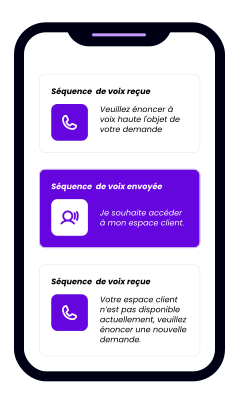
A natural language IVR takes voice interaction with the caller to a new level. Whereas speech recognition is limited to key words, natural language allows the caller to express themselves with the IVR as if they were talking to a human. The voice server can understand and analyze complete sentences and complex queries, directing the caller to the right voice page.
The questions asked to qualify the call are naturally more open-ended, reducing call qualification time. Where a DTMF menu or voice recognition would require several steps or questions to define the call intent, natural language will ask a broader question, thus eliciting more information in the answer to quickly transfer the call. Take the example of a customer contacting his insurance company, to whom the IVR would simply ask: “What is the reason for your call?”. With an answer like “I want to declare a claim in my apartment”, the call could be directly transferred to the team in charge of declaring claims in the housing sector.
Of course, some companies choose to use an IVR that combines voice recognition, natural language and keyboard interaction to deliver the best possible customer experience.
- Automated systems to streamline the caller experience
An IVR doesn’t just work by interacting with callers. In fact, navigation in the call flow of an IVR can be automatic, based on context data or predefined settings. Some call flow voice pages require no action from the caller to operate and route the call to the next page. Let’s explore a few use cases.
- Calendar switching
Calendar routing is a perfect example. A “calendar” voice page routes a call according to pre-set opening days and times. If a customer calls a company outside its opening hours, the call is automatically redirected to an announcement with an audio message indicating to call back later, or to voicemail. Otherwise, the call is transferred to the company’s destination number(s).
- Statistical percentage routing
There’s also percentage routing. When a call comes in, it is transferred to several destination numbers according to a statistical percentage. Let’s imagine a company with two customer service representatives. If one of them is more available to take customer calls, percentage routing redirects 70% of calls to him/her, and the remaining 30% to the other employee.
- Routing based on SI data
A final example is the operation of an interactive voice server with CTI (Couplage Téléphonie-Informatique). This technology enables data to be exchanged between the interactive voice server and a company’s information systems (database, CRM, ERP, etc.).
Take a company with VIP customers. When a customer calls, their phone number is automatically searched in the company’s database. If the customer is registered as a VIP, the call is transferred to the customer’s personal advisor, with no further interaction required. If the customer is not a VIP, the call is redirected to the company’s generic voice menu, to be qualified and routed to the right person.
Some interactive voice servers operate fully automatically, requiring no interaction from the caller or even a company employee to pick up the call. A concrete example would be a call to an order tracking service.
A interactive voice server is a powerful, flexible and versatile tool, as demonstrated by the way it works. To reach this point, it has had to evolve, and will continue to do so, to meet the needs of companies, but above all those of their customers and prospects. Indeed, it is their expectations of the telephone channel that have gradually defined the way interactive voice servers work today.
3- The benefits of an interactive voice server for businesses
Integrating an automated call center offers significant benefits, positively impacting various aspects of your company’s performance.
-
Optimizing call center performance
Incorporating an automated call center into your infrastructure guarantees increased efficiency. Request filtering enables calls to be allocated to the right agents, concentrating only on those requiring special attention. As a result, the sales department is less busy and can devote more time to solving customer problems, reducing waiting times and increasing overall customer service productivity.
-
Improved handling of customer requests
The multiple personalization options offered by the system enrich the customer experience. For example, contact identification makes it possible to personalize greetings according to the caller, creating a positive experience by greeting the customer by name right from the start. This personalization reduces waiting times by simplifying the process of getting in touch with a qualified agent.
-
Optimizing your telecom budget
Compared to a call center run exclusively by human advisors, a virtual call center generates significant savings. It eliminates the need to hire a large number of agents, reducing salary and telecommunications costs. The financial benefits encompass both telephone equipment and premises management. VoIP telephony, in particular, has taken the lead in business telephony in raising these crucial issues.
-
Around-the-clock assistance
With minimal human intervention, the call center can operate 24 hours a day, 7 days a week. Customers and prospects can get answers to their concerns at any time, without being restricted by opening hours. Beyond the cost savings, a call center enhances your company’s reputation. Customers who are satisfied with the experience offered by your organization help reinforce a positive image and generate praise.
In conclusion, integrating an interactive voice server boosts your company’s productivity, enhances its brand image and delivers substantial savings on a number of levels.
Optimization of costs associated with the information service: By integrating the IVR with a premium-rate number, every minute of the call can generate a financial return, providing an opportunity to improve contact center performance. It’s important to stress that the use of premium-rate numbers is permitted for the company’s prospects. However, it is essential that customers have access to their customer service via a standard number, at no extra cost.
4- Examples of IVR applications
The first contact your customers, partners or service providers have with your company is through the greeting message when they call. The main objective is to create a positive first impression and stand out from the competition with a personalized greeting. Clarity, conciseness, originality and specific adaptation to your clientele are essential to guarantee the effectiveness of your message.
Pre-hook messages
- “Welcome to (Company name). Your call will be answered in a few moments. Please stay on the line.”
- “Hello, you have reached (Company name). We are delighted to welcome you. Your call will be answered as soon as possible. Thank you for your patience.”
- “Hello and welcome to (Company name). We will follow up on your call.”
Switchboard messages
- “(Company name) Hello! Please select from the following options. For (service), press 1. For (service), press 2. To repeat this menu, press the star.”
- “Hello and welcome to (company name)! To contact the sales department, press 1. To contact the accounting department, press 2. For all other inquiries, please stay on the line, an advisor will take your call.”
To discover more detailed examples of all message categories, we invite you to download our free ready-to-use document: [I discover more examples](download link).
A- Welcome message: best practices to adopt
- Keep the message as short as possible: Limit your greeting to less than 10 seconds to avoid prolonging your customers’ wait unnecessarily.
- Adopt a cheerful, warm tone: Whether you choose a recording studio, a synthesized voice or your own recordings, make sure your customers feel your enthusiasm through a calm, cheerful, smiling tone.
- Personalize your message: Incorporate your company name and baseline to instantly reassure the caller. Adding background music can also add a touch of originality, but be sure to moderate the volume to ensure clarity.
B- Examples of answering machine messages
Your IVR software needs to be equipped with a function that allows you to play a greeting outside business hours. By reminding callers of your opening hours, they can leave a voice message for a later call back.
- “Welcome to (Company name). Our services are currently closed. Please call again. Thank you.”
- “(Name of your company) hello, we are open from (day) to (day) from (hour) to (hour) and from (day) to (day) from (hour) to (hour). Leave us your contact details and the subject of your message, and we’ll get back to you as soon as possible.”
- “Welcome to (Company name). We are currently unavailable. Please leave us a message with your contact details, and we will get back to you as soon as possible. Thank you for your understanding.”
To discover more examples, download our free ready-to-use document: [I discover more examples](download link).
C- Examples of waiting messages and best practices
Although on-hold messages are not always appreciated by callers, they remain crucial to the customer experience and the organization of customer service teams. Here are a few examples.
- “Welcome to (Company name), we are looking for your correspondent. Please wait a few moments.”
- “Welcome to (Company name). Your call is being processed. For a faster experience, please use our online services at www…com. Thank you for your understanding and patience.”
- “We’ll take your call, please stay on the line. Your estimated wait time is X minutes.”
- “All our agents are currently busy. To leave a message, press 1. To have an agent call you back, press 2. Otherwise, you can remain on the line and wait.”
5- The 2Be-FFICIENT solution for monitoring your interactive voice server
Ensuring an optimal user experience on your IVR requires tests that accurately reproduce real user behaviors and interactions.
At 2Be-FFICIENT, we’ve developed automata that accurately simulate user actions, testing your IVR at regular intervals from an external line.
To monitor your Interactive Voice Server, you benefit from a complete solution enabling you to :
- Confirm the functionality of voice menus, the sequence of DTMF interactions, and make sure your telephone provider is always available.
- Be proactively informed of any malfunctions and receive regular performance analyses.
Monitoring adapts to your routes by taking into account the various specificities of a voice route: voice recognition, non-observation range to manage calendar referrals, etc.
To go even further, our PLC can validate the routing of internal calls and simulate the reception of incoming calls, guaranteeing complete validation of your system.
Finally, if your users’ actual journey requires it, voice monitoring can be complemented by a web and mobile journey (e.g. authentication on an interface/application) for a complete end-to-end vision.